

In a perfect world, your brother/sister/mother/child would be a professional photographer who owed you a favour. You’d have them take beautiful head shots of you and your employees for FREE, which you’d then toss on your recently redesigned website for the world to see.
Alas, we live in an imperfect world.
But do not fret! This doesn’t mean you have to settle for crappy head shots on your website. Budget and time constraints often lead our smaller clients to taking a DIY approach to head shots for their websites, and you know what? That’s ok. While we encourage everyone to seek out a professional photographer to take brilliant portraits of their team, we understand that sometimes you just need to get images of your staff on your website as quickly as possible. And sometimes, the only decent camera you have kicking around is the one nestled inside your trusty iPhone (or Galaxy Note, if you swing that way).
We’ve compiled a few handy tips on how to take a decent head shot with your phone — follow these and you will end up with A++ images you’ll be proud to use to grow your business.
Have someone else take your photo
Although there are plenty of people on Instagram who have mastered the “art of the selfie”, we suggest having a friend or colleague take your headshot — the result is much more professional. (Plus, the front-facing camera on your phone takes lower resolution images.)
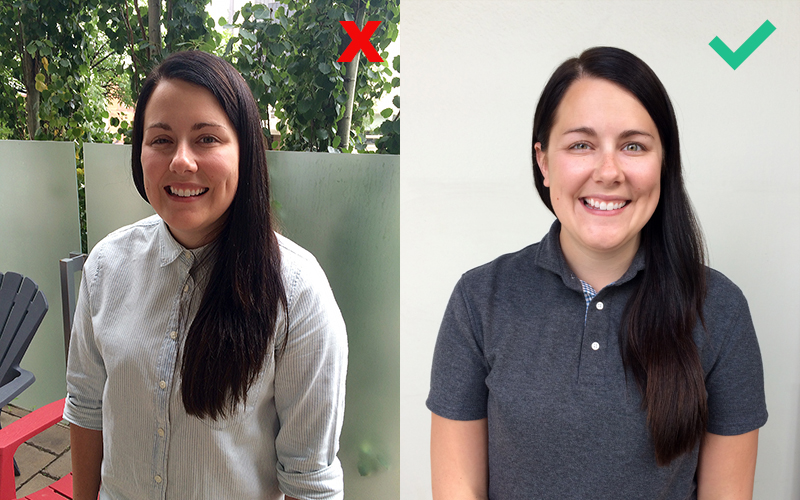
Use a neutral background
Choosing a neutral background — a plain or brick wall, a fence, even some simple greenery — will keep the focus on you. Watch out for objects in the background that might end up looking like they’re sticking out of your head.
Use even lighting
Probably the most important tip we can give you! If you’re outdoors, find a nice shaded spot to have your photo taken. Being photographed in direct sunlight creates bright highlights and heavy shadows on a person’s face, which isn’t very flattering. Overcast days are the best for shooting outdoors, because the light is very even. If your photo has to be taken indoors, try to find a spot that is lit with natural lighting (from a window).
Stand out!
Wear clothing that contrasts with your chosen background — no one wants to blend in with a grey wall! To look natural, wear the kind of outfit that you would normally wear to work. Dressing up in a tux is not necessary.
Pick a style and stick to it
Brand consistency is important — and the same is true for your headshots. Pick a style and stick to it! Don’t worry, this doesn’t mean making everyone stand in the exact same pose wearing the exact same thing, unless maybe your small business is a summer camp. Making little things consistent is important, such as using the same (or similar type of) background and shooting everyone at the same time of day (to match lighting). By doing this, you ensure each of your team members’ images look like they came from the same place.
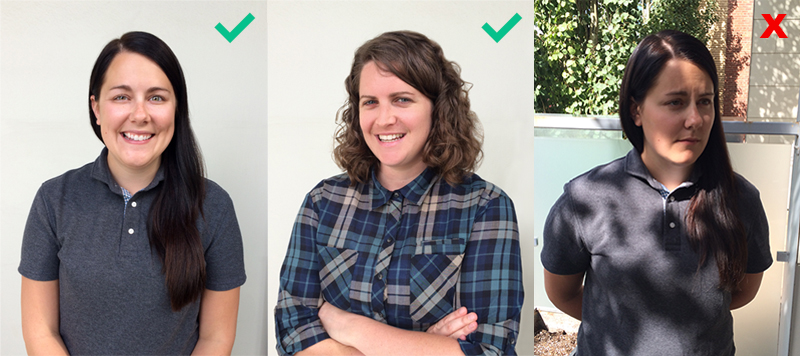
VOGUE. (Just kidding — strike a casual pose.)
Try and stand in a way that is relaxed, with your body angled slightly away from the camera. Fold your arms, have your hands on your hips, or put your hands in your pockets — whatever feels most natural. Remember to keep your shoulders back and your chin up.
Hold your phone steady
Make sure the photographer keeps the phone as still as they can by using both hands, and keeping their elbows tucked into their sides for support. (Breath normally — don’t let the pressure of being a photographer cause you to hyperventilate.)
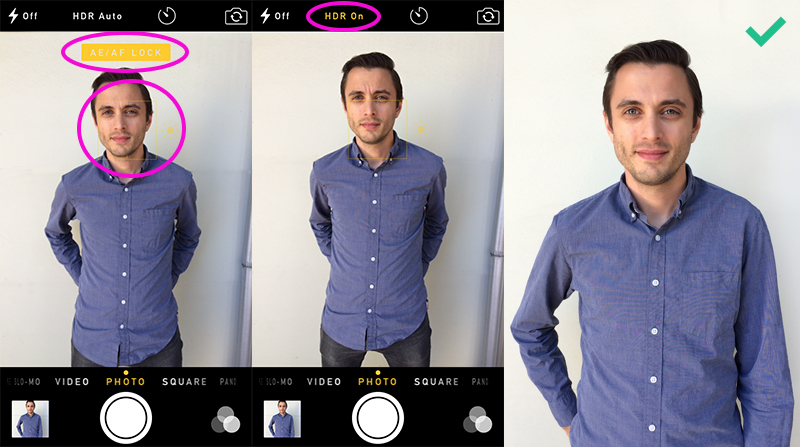
Use HDR mode
HDR is a mode of shooting that combines several exposures to create a single picture with more detail and a greater range of tones and colours. If your phone’s camera has it available, please use it.
Lock the auto-focus
Tap (or hold, depending on your phone) the screen where you want the camera to focus — the face — to lock the focus and keep the image sharp.
Give your head some space
Remember to leave space around your head and shoulders — the image can always be cropped tighter later if necessary. Don’t worry about including the lower torso and legs — this is a headshot, after all!
Don’t use digital zoom
Digital zoom lowers the resolution (and therefore quality) of an image. Have the person taking your photo step closer to you instead.
Shoot away!
The beauty of digital cameras (including phone cameras) is that you can take as many pictures as you want until you get the right one. Don’t be afraid to take a few — you can always delete (or meme) the ones that don’t work out!
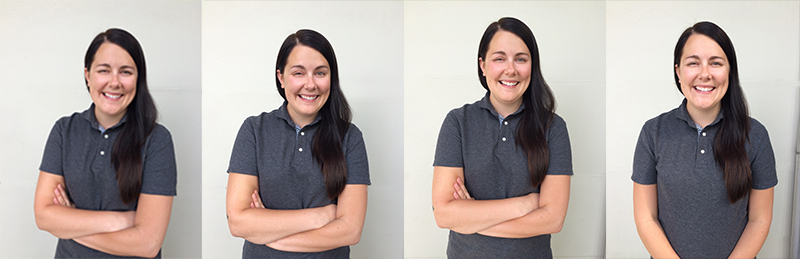
That’s all there is to it! We wish you the best of luck with your DIY head shots. When you’re ready to get some professional portraits taken, get in touch — we can recommend some awesome photographers.